Live sports odds in Google Sheets
Odds from 450+ bookmakers in your spreadsheet. Search a match and insert the best prices, or type =ODDS in any cell.
Works in any Google account · Only touches the open spreadsheet · Open source
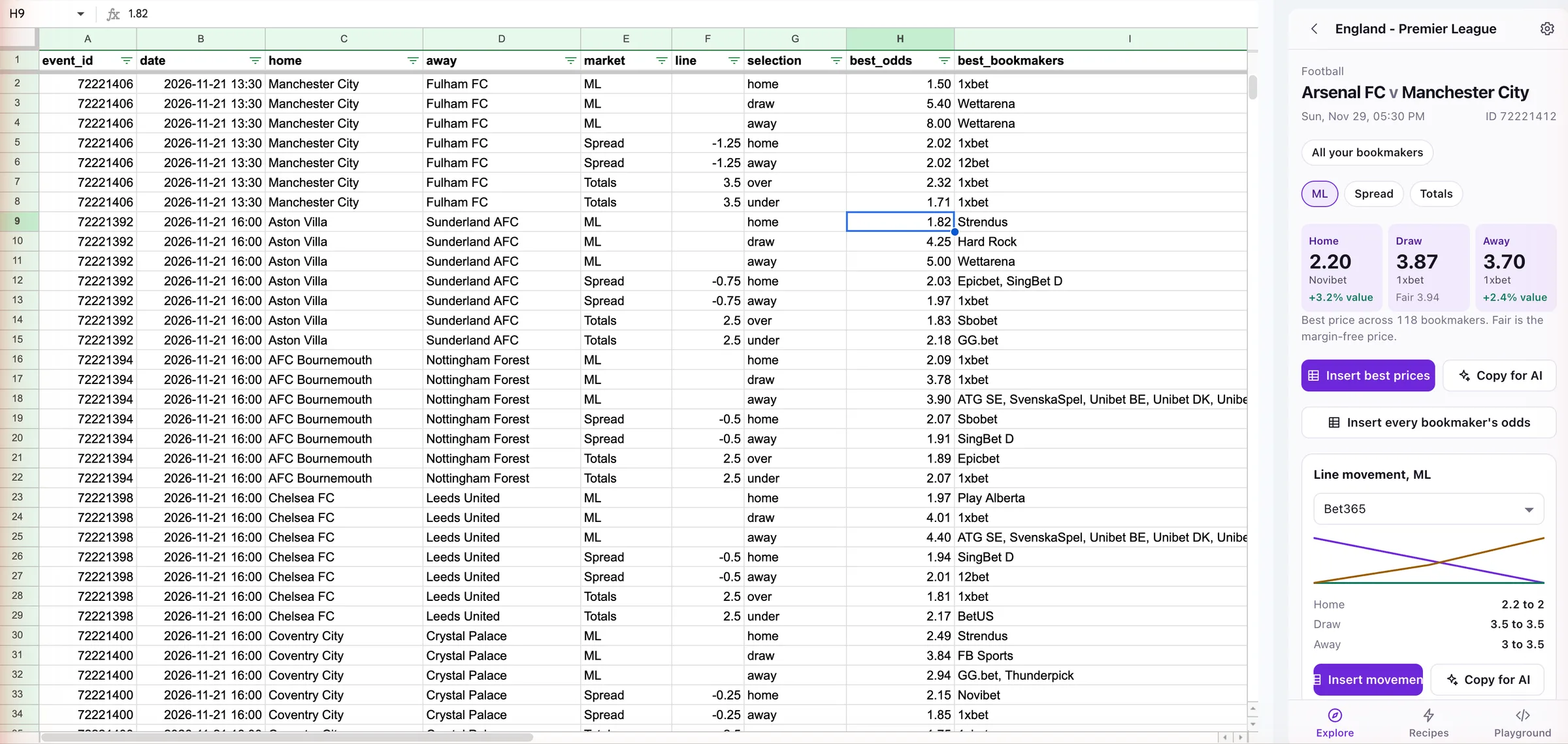
How to get live odds into Google Sheets in 3 steps
All you need is an Odds-API.io API key.
- 1
Install the add-on
Install it from the Google Workspace Marketplace. Works with any Google account.
- 2
Paste your API key
Open it from the Extensions menu and paste the key from your dashboard.
- 3
Insert odds
Search a match, run a recipe or type =ODDS in a cell.
Everything in one side panel
Everything lands as a plain table with typed columns, so filters, charts and pivot tables just work.
Explore
Search a team or league. See the best price per selection, the fair price and line movement, then insert it.
Recipes
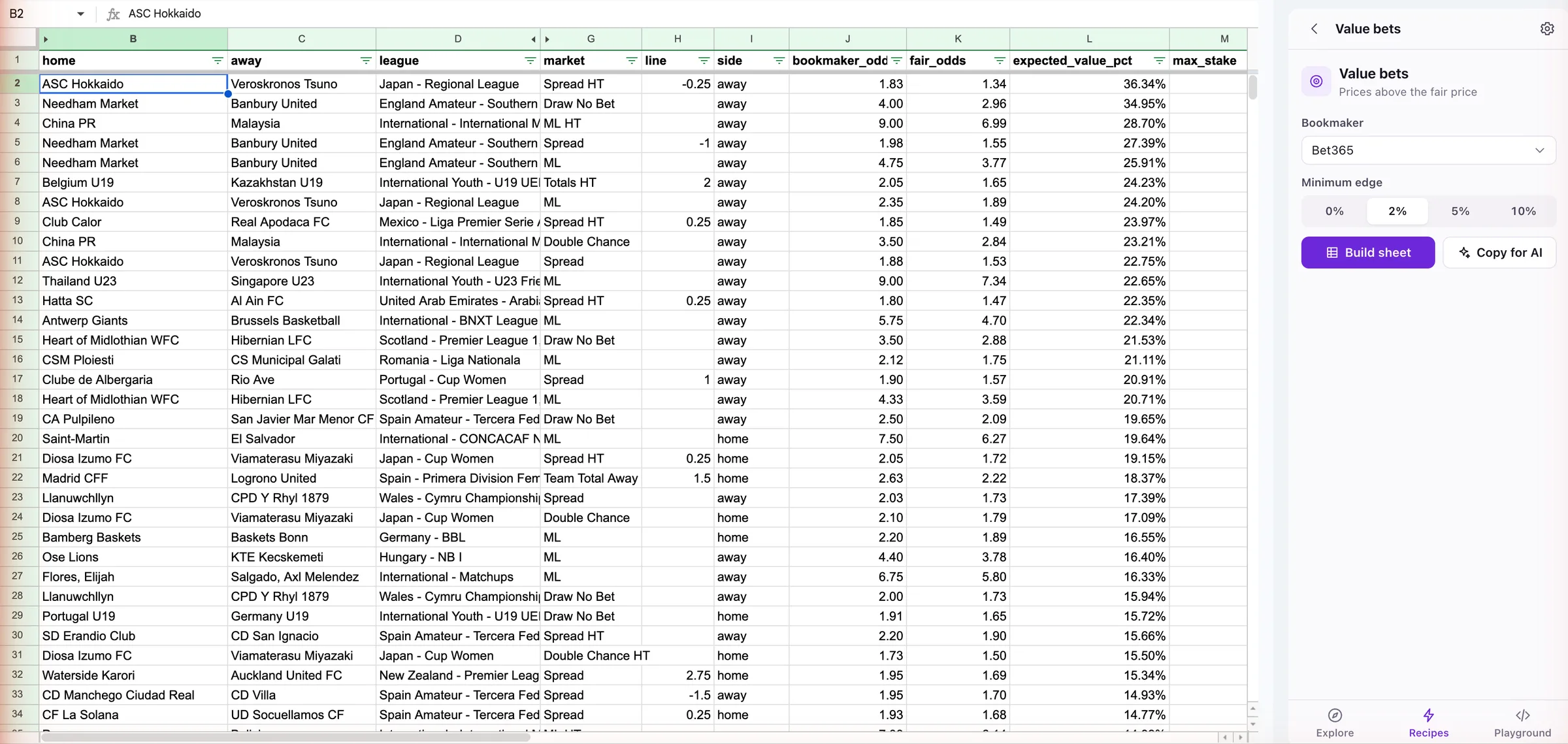
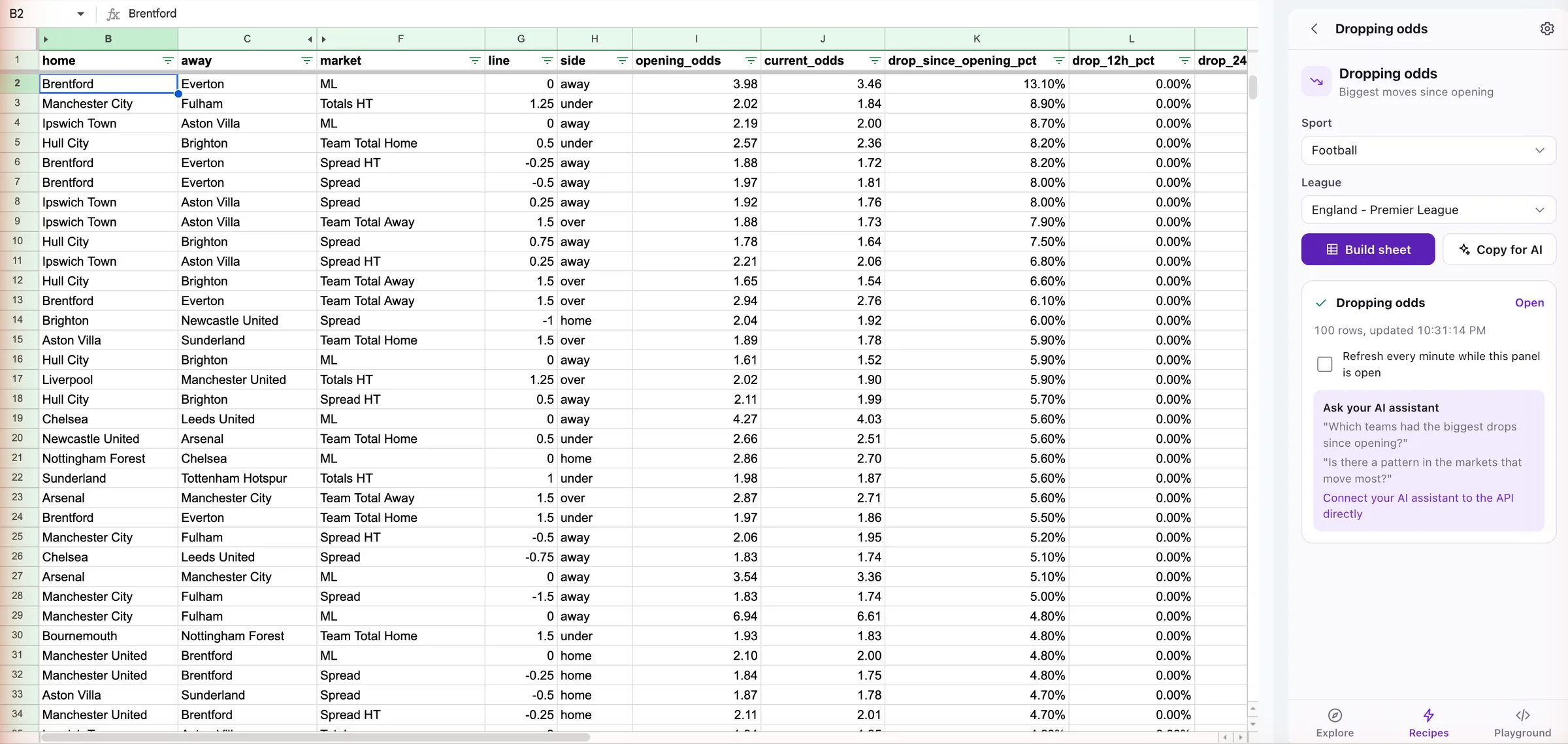
One click builds a sheet of best prices, arbitrage, value bets or dropping odds.
API Playground
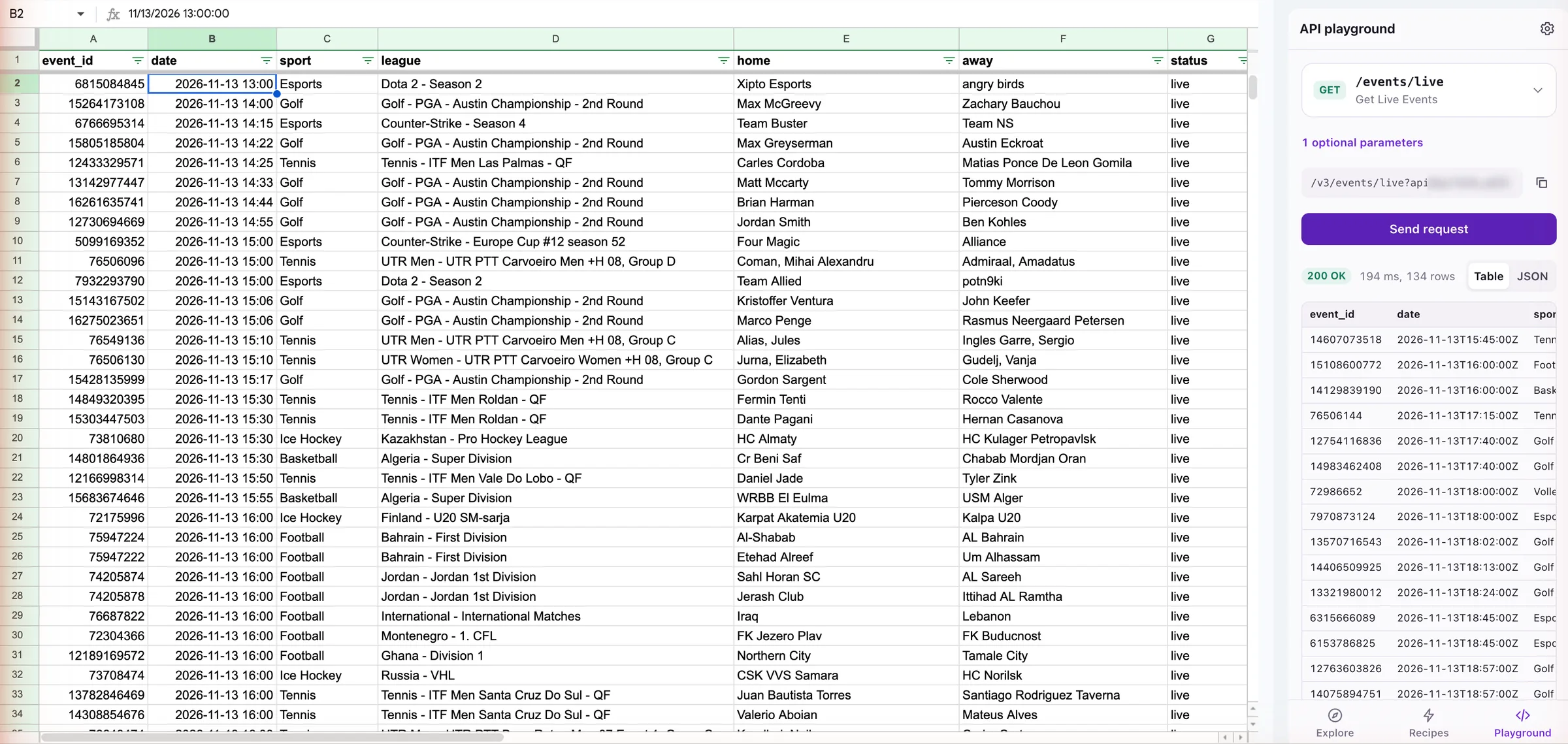
Call any API endpoint, preview the response and insert it as a table.
Auto-refresh
Recipe sheets update every 60 seconds while the panel is open.
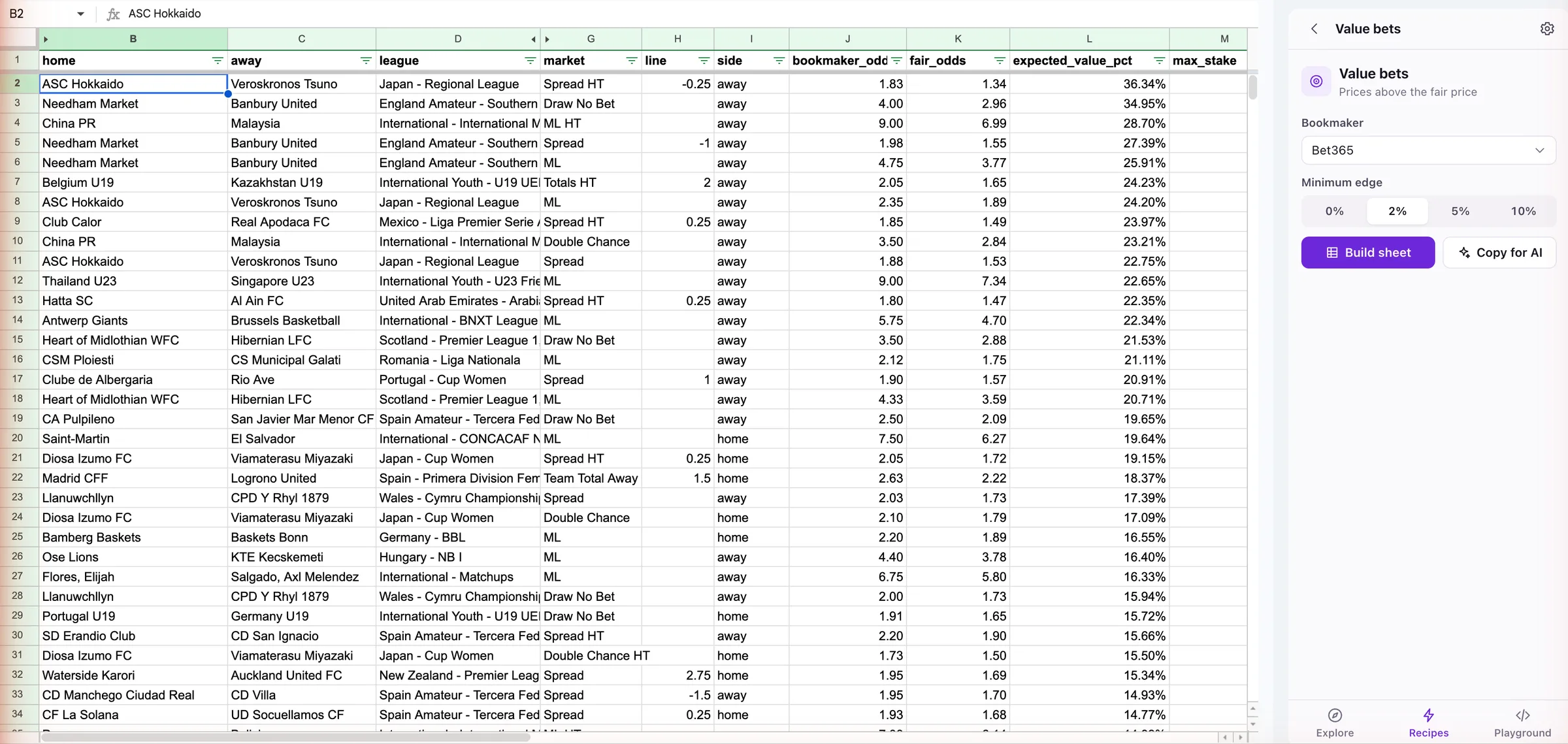
Value bets: bookmaker odds, fair odds and edge. 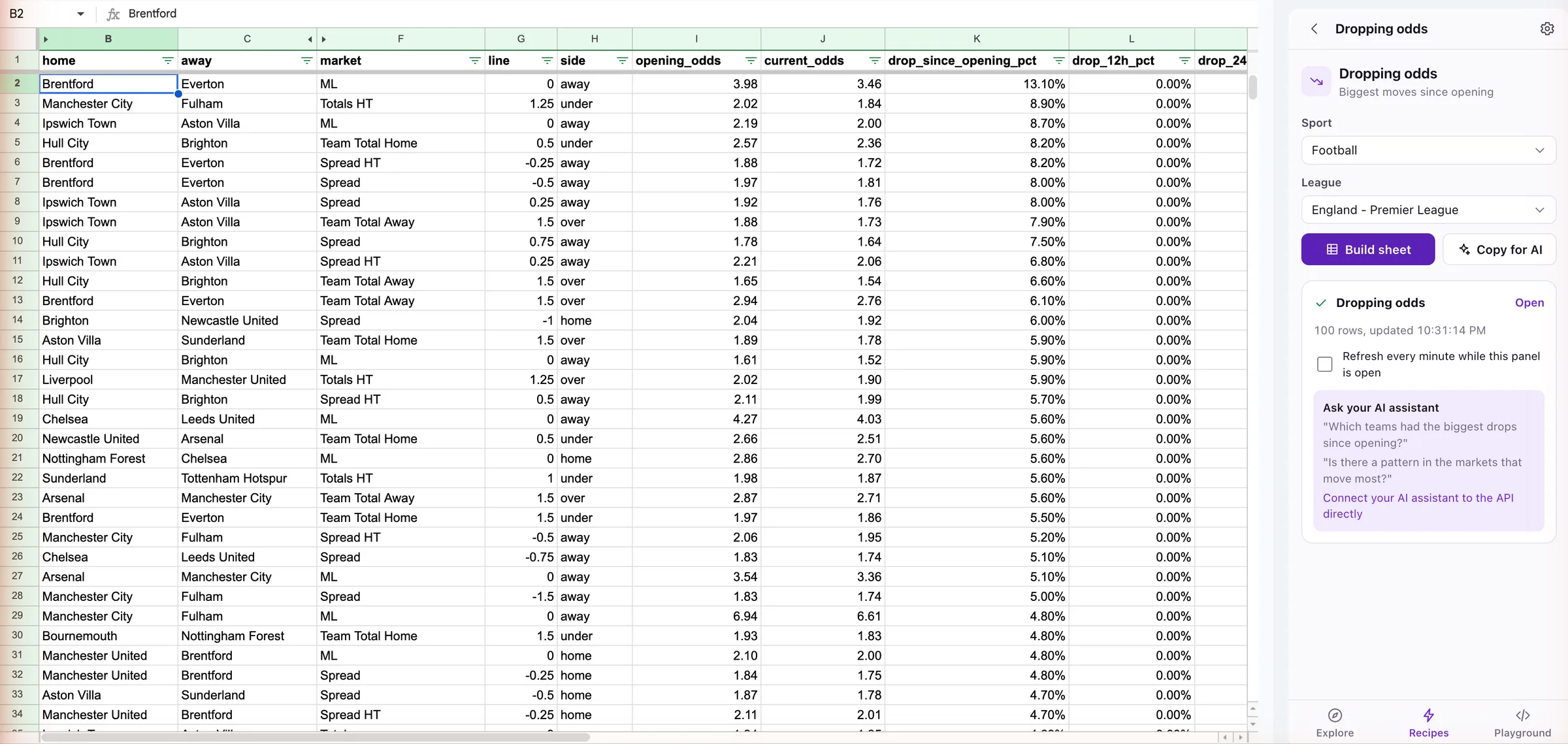
Dropping odds: how far each price has moved. 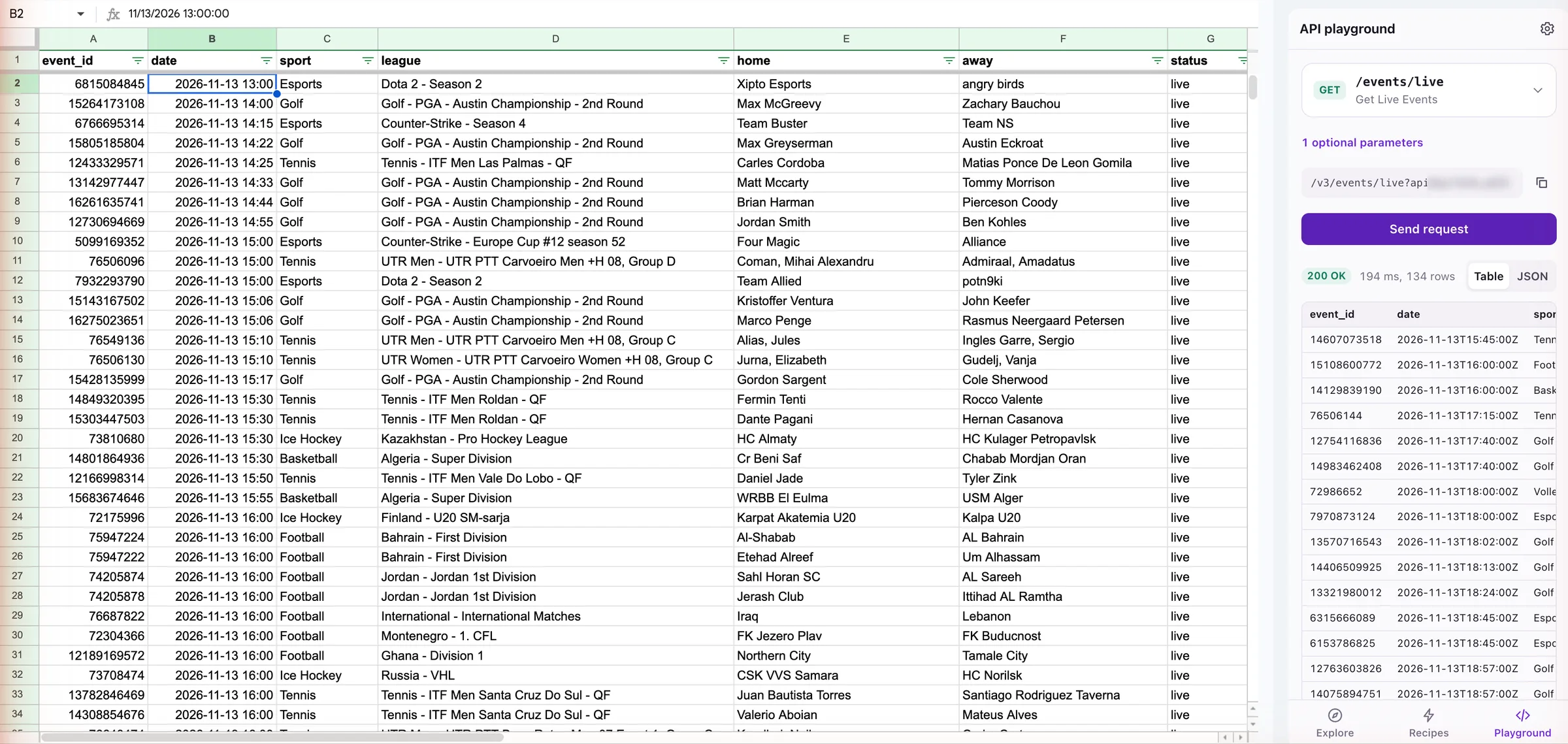
Any API endpoint into a table, like live events.
Sports odds formulas for any cell
Two custom functions that return a table. Use them like any other formula.
=ODDS
=ODDS(eventId, [market], [bookmaker], [refresh])
Every bookmaker’s odds for one event, one row per line and selection.
Returns columnsbookmakermarketlineselectionoddsupdated_at
=ODDS(61301163)Every market for one event=ODDS(61301163, "Totals", "Bet365")Bet365 totals lines only
=ODDS_TABLE
=ODDS_TABLE(sport, [league], [market], [refresh])
Best price per selection for the next 20 matches in a league. Growth plan and up.
Returns columnsevent_iddatehomeawayselectionbest_oddsbest_bookmaker
=ODDS_TABLE("football", "england-premier-league")Premier League match odds=ODDS_TABLE("basketball", "usa-nba", "Totals", A1)NBA totals, refetched when you change A1
To refresh, pass a cell you change, like a checkbox, as the last argument. Sheets does not allow NOW() here. Event IDs are in the Explore tab.
What people build with it
A few common setups.
Odds comparison
Best price per market for every match in a league.
Arbitrage scanner
Price gaps between your bookmakers, with the margin of each.
Value bets
Prices above the fair price, by bookmaker and minimum edge.
Ask AI about your odds
Clean, typed tables work well with Gemini in Sheets, ChatGPT and Claude.
Gemini in Sheets
Ask questions about any table the add-on writes.
Copy for AI
Copies a table with its column descriptions as one prompt for ChatGPT or Claude.
Suggested questions
Each recipe sheet comes with questions to ask, to get you started.
Want an assistant to query live odds itself, without a spreadsheet? Use the Odds-API.io MCP server.
Odds-API.io add-on vs other sports odds add-ons
Compared with The Odds API add-ons, based on each Marketplace listing.
| Feature | Odds-API.io | The Odds API add-ons |
|---|---|---|
| Bookmakers | 450+ | 100+ |
| Custom formulas | =ODDS and =ODDS_TABLE | None documented |
| Spreadsheet access | Only the open spreadsheet | All your spreadsheets |
| Google account data | None | Email address and profile |
| Auto-refresh | Every 60 seconds | Not listed |
| Arbitrage and value bet recipes | Built in | Not listed |
| API playground | Every GET endpoint | Not listed |
| Fair price and line movement | In the Explore tab | Not listed |
For the full API comparison, see Odds-API.io vs The Odds API.
Privacy and permissions
Three permissions. None reach your other files, email or profile.
spreadsheets.currentonly
Only the spreadsheet you open it in.
script.container.ui
Shows the side panel.
script.external_request
Calls api.odds-api.io and nothing else.
Your key is stored in your Google account and sent only to Odds-API.io with the filters you choose. The code is open source on GitHub. Read the full add-on privacy disclosure.
Google Sheets odds add-on FAQ
How do I get live sports odds into Google Sheets?
Install the Odds-API.io add-on, paste your API key and insert odds from the side panel or with =ODDS. It covers 450+ bookmakers.
Is there a Google Sheets formula for betting odds?
Yes. =ODDS(eventId) returns every bookmaker’s odds for one event, and =ODDS_TABLE(sport, league) the best price for each upcoming match.
Which sports and bookmakers are covered?
All 34 sports and 450+ bookmakers in the API, pre-match and live. You get the bookmakers selected on your plan.
How often do the odds refresh?
Recipe sheets every 60 seconds while the panel is open. Formulas refresh when you change the cell passed as their last argument, for example a checkbox.
What permissions does it need?
Access to the spreadsheet you open it in, the side panel, and calls to api.odds-api.io. It cannot see your other files, email or profile.
I get "Authorization is required". What do I do?
You are probably signed in to several Google accounts. Open the sheet in a private window with only the account you installed the add-on with.
Can I use this instead of IMPORTJSON?
Yes. No script to paste, no API URL to build, and your key is not visible in the sheet.
Do collaborators need the add-on?
Only to recalculate formulas. Tables from the panel are normal cells anyone can see.
Is the add-on free?
The add-on costs nothing, but it needs an Odds-API.io API key, which comes with a paid plan.
Is there an Excel version?
Not yet. In Excel you can load the same data from the REST API, for example with Power Query.
Put live odds in your next sheet
Install the add-on, paste your API key and build your first sheet.